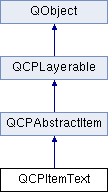
A text label. More...
Public Member Functions | |
| QBrush | brush () const |
| QColor | color () const |
| QFont | font () const |
| QMargins | padding () const |
| QPen | pen () const |
| Qt::Alignment | positionAlignment () const |
| QCPItemText (QCustomPlot *parentPlot) | |
| double | rotation () const |
| QBrush | selectedBrush () const |
| QColor | selectedColor () const |
| QFont | selectedFont () const |
| QPen | selectedPen () const |
| virtual double | selectTest (const QPointF &pos, bool onlySelectable, QVariant *details=0) const Q_DECL_OVERRIDE |
| void | setBrush (const QBrush &brush) |
| void | setColor (const QColor &color) |
| void | setFont (const QFont &font) |
| void | setPadding (const QMargins &padding) |
| void | setPen (const QPen &pen) |
| void | setPositionAlignment (Qt::Alignment alignment) |
| void | setRotation (double degrees) |
| void | setSelectedBrush (const QBrush &brush) |
| void | setSelectedColor (const QColor &color) |
| void | setSelectedFont (const QFont &font) |
| void | setSelectedPen (const QPen &pen) |
| void | setText (const QString &text) |
| void | setTextAlignment (Qt::Alignment alignment) |
| QString | text () const |
| Qt::Alignment | textAlignment () const |
 Public Member Functions inherited from QCPAbstractItem Public Member Functions inherited from QCPAbstractItem | |
| QCPItemAnchor * | anchor (const QString &name) const |
| QList< QCPItemAnchor * > | anchors () const |
| QCPAxisRect * | clipAxisRect () const |
| bool | clipToAxisRect () const |
| bool | hasAnchor (const QString &name) const |
| QCPItemPosition * | position (const QString &name) const |
| QList< QCPItemPosition * > | positions () const |
| QCPAbstractItem (QCustomPlot *parentPlot) | |
| bool | selectable () const |
| bool | selected () const |
| void | setClipAxisRect (QCPAxisRect *rect) |
| void | setClipToAxisRect (bool clip) |
| Q_SLOT void | setSelectable (bool selectable) |
| Q_SLOT void | setSelected (bool selected) |
| Public Member Functions inherited from QCPLayerable | |
| bool | antialiased () const |
| QCPLayer * | layer () const |
| QCPLayerable * | parentLayerable () const |
| QCustomPlot * | parentPlot () const |
| QCPLayerable (QCustomPlot *plot, QString targetLayer=QString(), QCPLayerable *parentLayerable=0) | |
| bool | realVisibility () const |
| void | setAntialiased (bool enabled) |
| Q_SLOT bool | setLayer (QCPLayer *layer) |
| bool | setLayer (const QString &layerName) |
| void | setVisible (bool on) |
| bool | visible () const |
Public Attributes | |
| QCPItemAnchor *const | bottom |
| QCPItemAnchor *const | bottomLeft |
| QCPItemAnchor *const | bottomRight |
| QCPItemAnchor *const | left |
| QCPItemPosition *const | position |
| QCPItemAnchor *const | right |
| QCPItemAnchor *const | top |
| QCPItemAnchor *const | topLeft |
| QCPItemAnchor *const | topRight |
Protected Types | |
| enum | AnchorIndex { aiTopLeft, aiTop, aiTopRight, aiRight, aiBottomRight, aiBottom, aiBottomLeft, aiLeft } |
Protected Member Functions | |
| virtual QPointF | anchorPixelPosition (int anchorId) const Q_DECL_OVERRIDE |
| virtual void | draw (QCPPainter *painter) Q_DECL_OVERRIDE |
| QPointF | getTextDrawPoint (const QPointF &pos, const QRectF &rect, Qt::Alignment positionAlignment) const |
| QBrush | mainBrush () const |
| QColor | mainColor () const |
| QFont | mainFont () const |
| QPen | mainPen () const |
| Protected Member Functions inherited from QCPAbstractItem | |
| virtual void | applyDefaultAntialiasingHint (QCPPainter *painter) const Q_DECL_OVERRIDE |
| virtual QRect | clipRect () const Q_DECL_OVERRIDE |
| QCPItemAnchor * | createAnchor (const QString &name, int anchorId) |
| QCPItemPosition * | createPosition (const QString &name) |
| virtual void | deselectEvent (bool *selectionStateChanged) Q_DECL_OVERRIDE |
| double | rectDistance (const QRectF &rect, const QPointF &pos, bool filledRect) const |
| virtual void | selectEvent (QMouseEvent *event, bool additive, const QVariant &details, bool *selectionStateChanged) Q_DECL_OVERRIDE |
| virtual QCP::Interaction | selectionCategory () const Q_DECL_OVERRIDE |
| Protected Member Functions inherited from QCPLayerable | |
| void | applyAntialiasingHint (QCPPainter *painter, bool localAntialiased, QCP::AntialiasedElement overrideElement) const |
| void | initializeParentPlot (QCustomPlot *parentPlot) |
| virtual void | mouseDoubleClickEvent (QMouseEvent *event, const QVariant &details) |
| virtual void | mouseMoveEvent (QMouseEvent *event, const QPointF &startPos) |
| virtual void | mousePressEvent (QMouseEvent *event, const QVariant &details) |
| virtual void | mouseReleaseEvent (QMouseEvent *event, const QPointF &startPos) |
| bool | moveToLayer (QCPLayer *layer, bool prepend) |
| virtual void | parentPlotInitialized (QCustomPlot *parentPlot) |
| void | setParentLayerable (QCPLayerable *parentLayerable) |
| virtual void | wheelEvent (QWheelEvent *event) |
Protected Attributes | |
| QBrush | mBrush |
| QColor | mColor |
| QFont | mFont |
| QMargins | mPadding |
| QPen | mPen |
| Qt::Alignment | mPositionAlignment |
| double | mRotation |
| QBrush | mSelectedBrush |
| QColor | mSelectedColor |
| QFont | mSelectedFont |
| QPen | mSelectedPen |
| QString | mText |
| Qt::Alignment | mTextAlignment |
| Protected Attributes inherited from QCPAbstractItem | |
| QList< QCPItemAnchor * > | mAnchors |
| QPointer< QCPAxisRect > | mClipAxisRect |
| bool | mClipToAxisRect |
| QList< QCPItemPosition * > | mPositions |
| bool | mSelectable |
| bool | mSelected |
| Protected Attributes inherited from QCPLayerable | |
| bool | mAntialiased |
| QCPLayer * | mLayer |
| QPointer< QCPLayerable > | mParentLayerable |
| QCustomPlot * | mParentPlot |
| bool | mVisible |
Additional Inherited Members | |
| Signals inherited from QCPAbstractItem | |
| void | selectableChanged (bool selectable) |
| void | selectionChanged (bool selected) |
| Signals inherited from QCPLayerable | |
| void | layerChanged (QCPLayer *newLayer) |
Detailed Description
A text label.

Its position is defined by the member position and the setting of setPositionAlignment. The latter controls which part of the text rect shall be aligned with position.
The text alignment itself (i.e. left, center, right) can be controlled with setTextAlignment.
The text may be rotated around the position point with setRotation.
Constructor & Destructor Documentation
|
explicit |
Creates a text item and sets default values.
The created item is automatically registered with parentPlot. This QCustomPlot instance takes ownership of the item, so do not delete it manually but use QCustomPlot::removeItem() instead.
Member Function Documentation
|
virtual |
This function is used to decide whether a click hits a layerable object or not.
pos is a point in pixel coordinates on the QCustomPlot surface. This function returns the shortest pixel distance of this point to the object. If the object is either invisible or the distance couldn't be determined, -1.0 is returned. Further, if onlySelectable is true and the object is not selectable, -1.0 is returned, too.
If the object is represented not by single lines but by an area like a QCPItemText or the bars of a QCPBars plottable, a click inside the area should also be considered a hit. In these cases this function thus returns a constant value greater zero but still below the parent plot's selection tolerance. (typically the selectionTolerance multiplied by 0.99).
Providing a constant value for area objects allows selecting line objects even when they are obscured by such area objects, by clicking close to the lines (i.e. closer than 0.99*selectionTolerance).
The actual setting of the selection state is not done by this function. This is handled by the parent QCustomPlot when the mouseReleaseEvent occurs, and the finally selected object is notified via the selectEvent/deselectEvent methods.
details is an optional output parameter. Every layerable subclass may place any information in details. This information will be passed to selectEvent when the parent QCustomPlot decides on the basis of this selectTest call, that the object was successfully selected. The subsequent call to selectEvent will carry the details. This is useful for multi-part objects (like QCPAxis). This way, a possibly complex calculation to decide which part was clicked is only done once in selectTest. The result (i.e. the actually clicked part) can then be placed in details. So in the subsequent selectEvent, the decision which part was selected doesn't have to be done a second time for a single selection operation.
In the case of 1D Plottables (QCPAbstractPlottable1D, like QCPGraph or QCPBars) details will be set to a QCPDataSelection, describing the closest data point to pos.
You may pass 0 as details to indicate that you are not interested in those selection details.
- See also
- selectEvent, deselectEvent, mousePressEvent, wheelEvent, QCustomPlot::setInteractions, QCPAbstractPlottable1D::selectTestRect
Implements QCPAbstractItem.
| void QCPItemText::setBrush | ( | const QBrush & | brush | ) |
Sets the brush that will be used do fill the background of the text. To disable the background, set brush to Qt::NoBrush.
- See also
- setSelectedBrush, setPen, setPadding
| void QCPItemText::setColor | ( | const QColor & | color | ) |
Sets the color of the text.
| void QCPItemText::setFont | ( | const QFont & | font | ) |
Sets the font of the text.
- See also
- setSelectedFont, setColor
| void QCPItemText::setPadding | ( | const QMargins & | padding | ) |
| void QCPItemText::setPen | ( | const QPen & | pen | ) |
Sets the pen that will be used do draw a rectangular border around the text. To disable the border, set pen to Qt::NoPen.
- See also
- setSelectedPen, setBrush, setPadding
| void QCPItemText::setPositionAlignment | ( | Qt::Alignment | alignment | ) |
Sets which point of the text rect shall be aligned with position.
Examples:
- If alignment is
Qt::AlignHCenter | Qt::AlignTop, the text will be positioned such that the top of the text rect will be horizontally centered on position. - If alignment is
Qt::AlignLeft | Qt::AlignBottom, position will indicate the bottom left corner of the text rect.
If you want to control the alignment of (multi-lined) text within the text rect, use setTextAlignment.
| void QCPItemText::setRotation | ( | double | degrees | ) |
Sets the angle in degrees by which the text (and the text rectangle, if visible) will be rotated around position.
| void QCPItemText::setSelectedBrush | ( | const QBrush & | brush | ) |
Sets the brush that will be used do fill the background of the text, when the item is selected. To disable the background, set brush to Qt::NoBrush.
- See also
- setBrush
| void QCPItemText::setSelectedColor | ( | const QColor & | color | ) |
Sets the color of the text that will be used when the item is selected.
| void QCPItemText::setSelectedFont | ( | const QFont & | font | ) |
Sets the font of the text that will be used when the item is selected.
- See also
- setFont
| void QCPItemText::setSelectedPen | ( | const QPen & | pen | ) |
Sets the pen that will be used do draw a rectangular border around the text, when the item is selected. To disable the border, set pen to Qt::NoPen.
- See also
- setPen
| void QCPItemText::setText | ( | const QString & | text | ) |
Sets the text that will be displayed. Multi-line texts are supported by inserting a line break character, e.g. '
'.
- See also
- setFont, setColor, setTextAlignment
| void QCPItemText::setTextAlignment | ( | Qt::Alignment | alignment | ) |
Controls how (multi-lined) text is aligned inside the text rect (typically Qt::AlignLeft, Qt::AlignCenter or Qt::AlignRight).
The documentation for this class was generated from the following files:
- projects/gui/3rdparty/qcustomplot/qcustomplot.h
- projects/gui/3rdparty/qcustomplot/qcustomplot.cpp