Base class for all drawable objects. More...
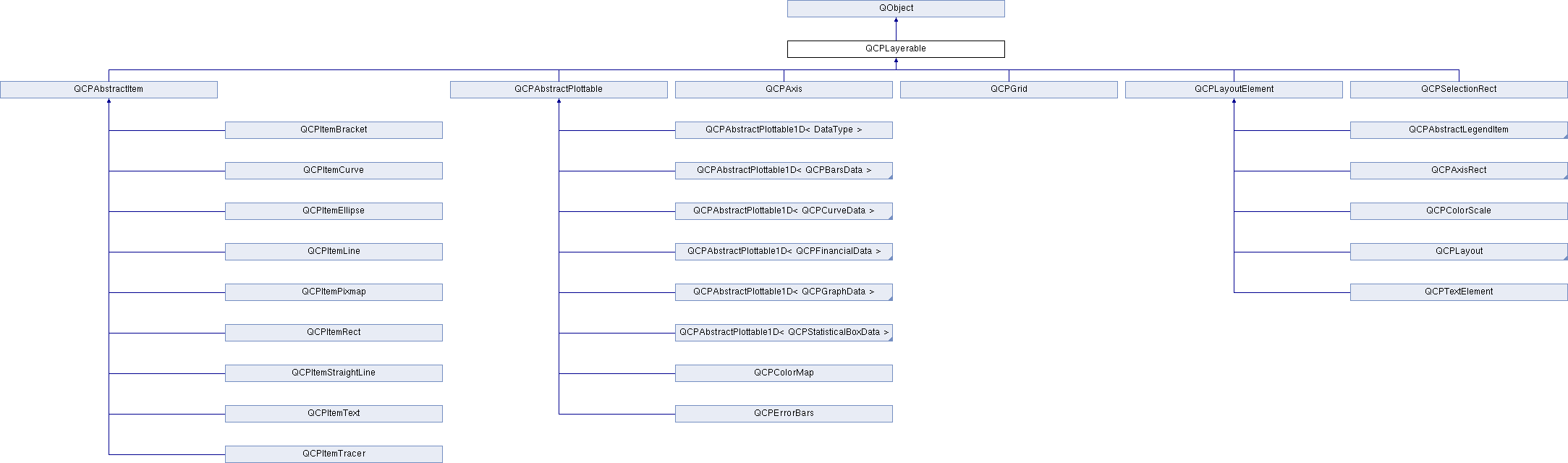
Signals | |
| void | layerChanged (QCPLayer *newLayer) |
Public Member Functions | |
| bool | antialiased () const |
| QCPLayer * | layer () const |
| QCPLayerable * | parentLayerable () const |
| QCustomPlot * | parentPlot () const |
| QCPLayerable (QCustomPlot *plot, QString targetLayer=QString(), QCPLayerable *parentLayerable=0) | |
| bool | realVisibility () const |
| virtual double | selectTest (const QPointF &pos, bool onlySelectable, QVariant *details=0) const |
| void | setAntialiased (bool enabled) |
| Q_SLOT bool | setLayer (QCPLayer *layer) |
| bool | setLayer (const QString &layerName) |
| void | setVisible (bool on) |
| bool | visible () const |
Protected Member Functions | |
| void | applyAntialiasingHint (QCPPainter *painter, bool localAntialiased, QCP::AntialiasedElement overrideElement) const |
| virtual void | applyDefaultAntialiasingHint (QCPPainter *painter) const =0 |
| virtual QRect | clipRect () const |
| virtual void | deselectEvent (bool *selectionStateChanged) |
| virtual void | draw (QCPPainter *painter)=0 |
| void | initializeParentPlot (QCustomPlot *parentPlot) |
| virtual void | mouseDoubleClickEvent (QMouseEvent *event, const QVariant &details) |
| virtual void | mouseMoveEvent (QMouseEvent *event, const QPointF &startPos) |
| virtual void | mousePressEvent (QMouseEvent *event, const QVariant &details) |
| virtual void | mouseReleaseEvent (QMouseEvent *event, const QPointF &startPos) |
| bool | moveToLayer (QCPLayer *layer, bool prepend) |
| virtual void | parentPlotInitialized (QCustomPlot *parentPlot) |
| virtual void | selectEvent (QMouseEvent *event, bool additive, const QVariant &details, bool *selectionStateChanged) |
| virtual QCP::Interaction | selectionCategory () const |
| void | setParentLayerable (QCPLayerable *parentLayerable) |
| virtual void | wheelEvent (QWheelEvent *event) |
Protected Attributes | |
| bool | mAntialiased |
| QCPLayer * | mLayer |
| QPointer< QCPLayerable > | mParentLayerable |
| QCustomPlot * | mParentPlot |
| bool | mVisible |
Friends | |
| class | QCPAxisRect |
| class | QCPLayer |
| class | QCustomPlot |
Detailed Description
Base class for all drawable objects.
This is the abstract base class most visible objects derive from, e.g. plottables, axes, grid etc.
Every layerable is on a layer (QCPLayer) which allows controlling the rendering order by stacking the layers accordingly.
For details about the layering mechanism, see the QCPLayer documentation.
Constructor & Destructor Documentation
| QCPLayerable::QCPLayerable | ( | QCustomPlot * | plot, |
| QString | targetLayer = QString(), |
||
| QCPLayerable * | parentLayerable = 0 |
||
| ) |
Creates a new QCPLayerable instance.
Since QCPLayerable is an abstract base class, it can't be instantiated directly. Use one of the derived classes.
If plot is provided, it automatically places itself on the layer named targetLayer. If targetLayer is an empty string, it places itself on the current layer of the plot (see QCustomPlot::setCurrentLayer).
It is possible to provide 0 as plot. In that case, you should assign a parent plot at a later time with initializeParentPlot.
The layerable's parent layerable is set to parentLayerable, if provided. Direct layerable parents are mainly used to control visibility in a hierarchy of layerables. This means a layerable is only drawn, if all its ancestor layerables are also visible. Note that parentLayerable does not become the QObject-parent (for memory management) of this layerable, plot does. It is not uncommon to set the QObject-parent to something else in the constructors of QCPLayerable subclasses, to guarantee a working destruction hierarchy.
Member Function Documentation
|
signal |
This signal is emitted when the layer of this layerable changes, i.e. this layerable is moved to a different layer.
- See also
- setLayer
|
protectedvirtual |
This event gets called when the user presses the mouse button a second time in a double-click, while the cursor is over the layerable. Whether a cursor is over the layerable is decided by a preceding call to selectTest.
The mouseDoubleClickEvent is called instead of the second mousePressEvent. So in the case of a double-click, the event succession is pressEvent – releaseEvent – doubleClickEvent – releaseEvent.
The current pixel position of the cursor on the QCustomPlot widget is accessible via event->pos(). The parameter details contains layerable-specific details about the hit, which were generated in the previous call to selectTest. For example, One-dimensional plottables like QCPGraph or QCPBars convey the clicked data point in the details parameter, as QCPDataSelection packed as QVariant. Multi-part objects convey the specific SelectablePart that was hit (e.g. QCPAxis::SelectablePart in the case of axes).
Similarly to mousePressEvent, once a layerable has accepted the mouseDoubleClickEvent, it is considered the mouse grabber and will receive all following calls to mouseMoveEvent and mouseReleaseEvent for this mouse interaction (a "mouse interaction" in this context ends with the release).
The default implementation does nothing except explicitly ignoring the event with event->ignore().
- See also
- mousePressEvent, mouseMoveEvent, mouseReleaseEvent, wheelEvent
Reimplemented in QCPTextElement.
|
protectedvirtual |
This event gets called when the user moves the mouse while holding a mouse button, after this layerable has become the mouse grabber by accepting the preceding mousePressEvent.
The current pixel position of the cursor on the QCustomPlot widget is accessible via event->pos(). The parameter startPos indicates the position where the initial mousePressEvent occured, that started the mouse interaction.
The default implementation does nothing.
Reimplemented in QCPColorScale, QCPAxisRect, and QCPAxis.
|
protectedvirtual |
This event gets called when the user presses a mouse button while the cursor is over the layerable. Whether a cursor is over the layerable is decided by a preceding call to selectTest.
The current pixel position of the cursor on the QCustomPlot widget is accessible via event->pos(). The parameter details contains layerable-specific details about the hit, which were generated in the previous call to selectTest. For example, One-dimensional plottables like QCPGraph or QCPBars convey the clicked data point in the details parameter, as QCPDataSelection packed as QVariant. Multi-part objects convey the specific SelectablePart that was hit (e.g. QCPAxis::SelectablePart in the case of axes).
QCustomPlot uses an event propagation system that works the same as Qt's system. If your layerable doesn't reimplement the mousePressEvent or explicitly calls event->ignore() in its reimplementation, the event will be propagated to the next layerable in the stacking order.
Once a layerable has accepted the mousePressEvent, it is considered the mouse grabber and will receive all following calls to mouseMoveEvent or mouseReleaseEvent for this mouse interaction (a "mouse interaction" in this context ends with the release).
The default implementation does nothing except explicitly ignoring the event with event->ignore().
Reimplemented in QCPColorScale, QCPTextElement, QCPAxisRect, and QCPAxis.
|
protectedvirtual |
This event gets called when the user releases the mouse button, after this layerable has become the mouse grabber by accepting the preceding mousePressEvent.
The current pixel position of the cursor on the QCustomPlot widget is accessible via event->pos(). The parameter startPos indicates the position where the initial mousePressEvent occured, that started the mouse interaction.
The default implementation does nothing.
Reimplemented in QCPColorScale, QCPTextElement, QCPAxisRect, and QCPAxis.
|
inline |
Returns the parent layerable of this layerable. The parent layerable is used to provide visibility hierarchies in conjunction with the method realVisibility. This way, layerables only get drawn if their parent layerables are visible, too.
Note that a parent layerable is not necessarily also the QObject parent for memory management. Further, a layerable doesn't always have a parent layerable, so this function may return 0.
A parent layerable is set implicitly when placed inside layout elements and doesn't need to be set manually by the user.
| bool QCPLayerable::realVisibility | ( | ) | const |
Returns whether this layerable is visible, taking the visibility of the layerable parent and the visibility of this layerable's layer into account. This is the method that is consulted to decide whether a layerable shall be drawn or not.
If this layerable has a direct layerable parent (usually set via hierarchies implemented in subclasses, like in the case of QCPLayoutElement), this function returns true only if this layerable has its visibility set to true and the parent layerable's realVisibility returns true.
|
virtual |
This function is used to decide whether a click hits a layerable object or not.
pos is a point in pixel coordinates on the QCustomPlot surface. This function returns the shortest pixel distance of this point to the object. If the object is either invisible or the distance couldn't be determined, -1.0 is returned. Further, if onlySelectable is true and the object is not selectable, -1.0 is returned, too.
If the object is represented not by single lines but by an area like a QCPItemText or the bars of a QCPBars plottable, a click inside the area should also be considered a hit. In these cases this function thus returns a constant value greater zero but still below the parent plot's selection tolerance. (typically the selectionTolerance multiplied by 0.99).
Providing a constant value for area objects allows selecting line objects even when they are obscured by such area objects, by clicking close to the lines (i.e. closer than 0.99*selectionTolerance).
The actual setting of the selection state is not done by this function. This is handled by the parent QCustomPlot when the mouseReleaseEvent occurs, and the finally selected object is notified via the selectEvent/deselectEvent methods.
details is an optional output parameter. Every layerable subclass may place any information in details. This information will be passed to selectEvent when the parent QCustomPlot decides on the basis of this selectTest call, that the object was successfully selected. The subsequent call to selectEvent will carry the details. This is useful for multi-part objects (like QCPAxis). This way, a possibly complex calculation to decide which part was clicked is only done once in selectTest. The result (i.e. the actually clicked part) can then be placed in details. So in the subsequent selectEvent, the decision which part was selected doesn't have to be done a second time for a single selection operation.
In the case of 1D Plottables (QCPAbstractPlottable1D, like QCPGraph or QCPBars) details will be set to a QCPDataSelection, describing the closest data point to pos.
You may pass 0 as details to indicate that you are not interested in those selection details.
- See also
- selectEvent, deselectEvent, mousePressEvent, wheelEvent, QCustomPlot::setInteractions, QCPAbstractPlottable1D::selectTestRect
Reimplemented in QCPItemBracket, QCPItemTracer, QCPItemPixmap, QCPItemEllipse, QCPItemText, QCPItemRect, QCPItemCurve, QCPItemLine, QCPItemStraightLine, QCPErrorBars, QCPFinancial, QCPColorMap, QCPStatisticalBox, QCPBars, QCPCurve, QCPGraph, QCPTextElement, QCPLegend, QCPAbstractLegendItem, QCPAbstractPlottable1D< DataType >, QCPAbstractPlottable1D< QCPFinancialData >, QCPAbstractPlottable1D< QCPStatisticalBoxData >, QCPAbstractPlottable1D< QCPGraphData >, QCPAbstractPlottable1D< QCPBarsData >, QCPAbstractPlottable1D< QCPCurveData >, QCPAbstractItem, QCPAbstractPlottable, QCPAxis, QCPLayoutInset, and QCPLayoutElement.
| void QCPLayerable::setAntialiased | ( | bool | enabled | ) |
Sets whether this object will be drawn antialiased or not.
Note that antialiasing settings may be overridden by QCustomPlot::setAntialiasedElements and QCustomPlot::setNotAntialiasedElements.
| bool QCPLayerable::setLayer | ( | QCPLayer * | layer | ) |
Sets the layer of this layerable object. The object will be placed on top of the other objects already on layer.
If layer is 0, this layerable will not be on any layer and thus not appear in the plot (or interact/receive events).
Returns true if the layer of this layerable was successfully changed to layer.
| bool QCPLayerable::setLayer | ( | const QString & | layerName | ) |
This is an overloaded member function, provided for convenience. It differs from the above function only in what argument(s) it accepts. Sets the layer of this layerable object by name
Returns true on success, i.e. if layerName is a valid layer name.
| void QCPLayerable::setVisible | ( | bool | on | ) |
Sets the visibility of this layerable object. If an object is not visible, it will not be drawn on the QCustomPlot surface, and user interaction with it (e.g. click and selection) is not possible.
|
protectedvirtual |
This event gets called when the user turns the mouse scroll wheel while the cursor is over the layerable. Whether a cursor is over the layerable is decided by a preceding call to selectTest.
The current pixel position of the cursor on the QCustomPlot widget is accessible via event->pos().
The event->delta() indicates how far the mouse wheel was turned, which is usually +/- 120 for single rotation steps. However, if the mouse wheel is turned rapidly, multiple steps may accumulate to one event, making event->delta() larger. On the other hand, if the wheel has very smooth steps or none at all, the delta may be smaller.
The default implementation does nothing.
Reimplemented in QCPColorScale, QCPAxisRect, and QCPAxis.
The documentation for this class was generated from the following files:
- projects/gui/3rdparty/qcustomplot/qcustomplot.h
- projects/gui/3rdparty/qcustomplot/qcustomplot.cpp